Employee
Records hours, breaks, travel time and projects. Reviews their own month and prepares reports.
Daily entries · history · offline work
 ARWIVO
 TIME · Final testing phase
Employees record their day on a phone. Owners and administrators manage the team in a web panel. Entries, monthly overviews and reports in one workflow.
ARWIVO Time is in its final testing phase. Its public Google Play release is coming soon.
Google Play — coming soon

One company, different needs
Access to data and actions depends on each person’s company role and permissions.
Records hours, breaks, travel time and projects. Reviews their own month and prepares reports.
Daily entries · history · offline work
Helps with entries, employees and projects within their assigned permissions.
Team · projects · change history
Manages company access, reviews the team and uses reports and data backups.
Web panel · reports · recovery
Inside the app
Choose an area to explore.
Your month
The overview shows net time, working days and absences for the selected period.
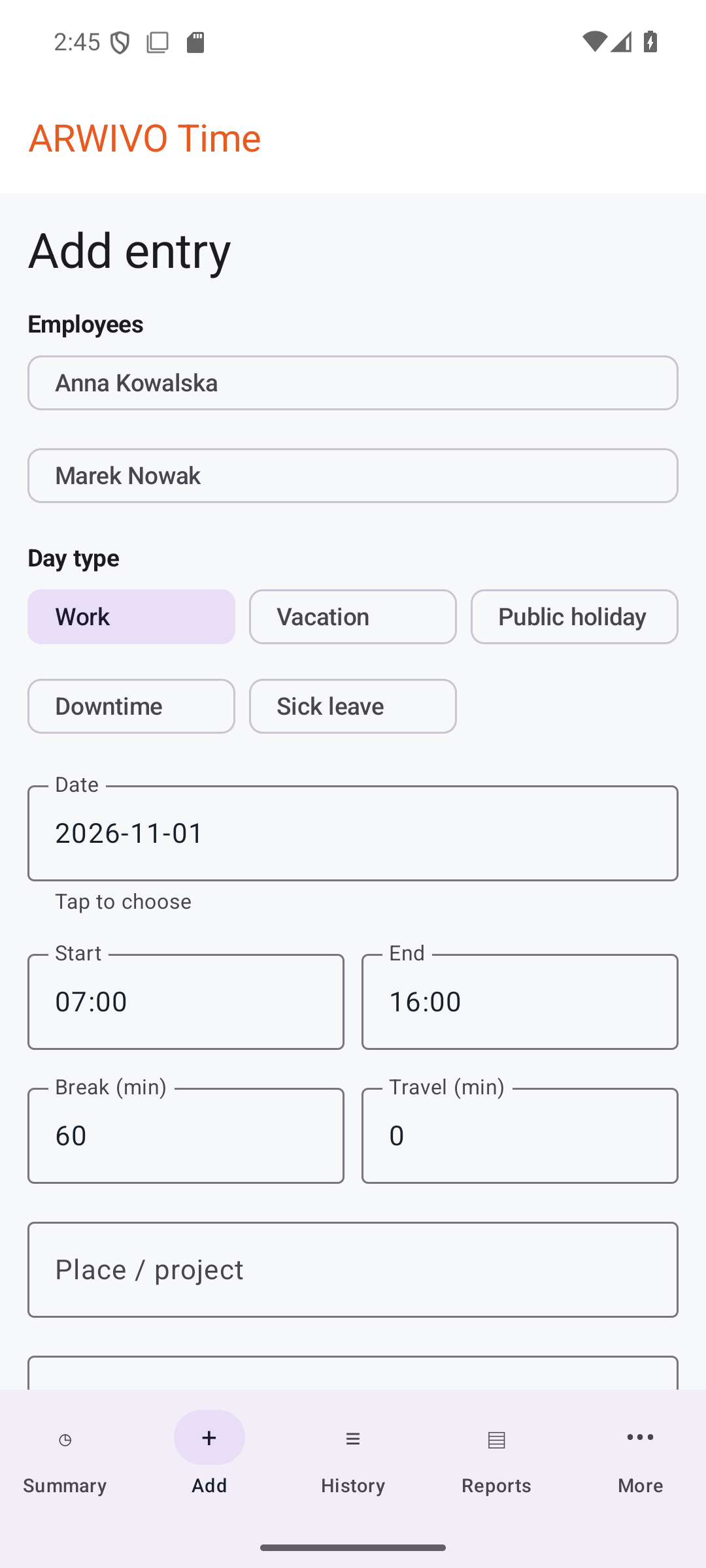
Record the day
Choose the day type, hours, break, travel time and project. After signing in, you can save entries offline too.
Your chosen period
Choose the data range and report options. Save or print the resulting PDF.

Revisit your entries
Find saved entries in the history. Editing depends on your permissions and whether the period is open.

A simple workflow
Enter working time and the details you need on your phone.
Offline changes wait for a connection. Conflicts that need a decision are not silently overwritten.
Choose a person or team, a period and the available report options.
Web panel
The panel makes it easier to work with the team, projects and reports. Android and the panel use the same company data.
Data and access
Roles, access checks and backups support everyday work with data.
The server checks access to company data against membership and permissions.
The app session is encrypted; local data is stored in the app’s private storage.
Encrypted company backups support recovery. Restoring requires owner permissions and confirmation.
Plans
We are finalising the offer. Prices, limits and plan terms will be announced at the public launch.
Plans cannot be purchased and public accounts cannot be created yet.
Questions
Not publicly yet. Version 2.5.0 is available only in Google Play internal testing. This page does not provide an installation link.
After signing in, entries can be saved locally. Sign-in, synchronisation and the web panel need an internet connection.
Yes. The web panel handles company data, the team and reports according to assigned permissions.
Yes. Reports can cover an individual or a team and a selected period.
No. ARWIVO Time is a separate company product with accounts and synchronisation. Calculate Work Time is an independent ARWIVO tool.
Updates
Current Android version
2.5.0Build 16Google Play internal test
Available to testers in Google Play internal testing. The public launch has not started.
Development and test-version history for Android and the web panel, including test candidates. Dates refer to changes recorded in the project, not public releases.
Build 16Changes dated:
Build 15Changes dated:
Build 14Changes dated:
Build 13Changes dated:
Build 12Changes dated:
Build 11Changes dated:
Build 10Changes dated:
Build 9Changes dated:
Build 8Changes dated:
Build 7Changes dated:
Build 6Changes dated:
Build 5Changes dated:
Build 4Changes dated:
Build 3Changes dated:
Build 2Changes dated:
ARWIVO TIME
ARWIVO Time is in its final testing phase. Its public Google Play release is coming soon.